TS_OFFSET
This function time-shifts a time series, i.e. uses values from a period which is different from the current calculation period. More precisely, TS_OFFSET will produce points at the same timestamps as those of the input time series, but use the offset to determine their functional values and flags. This may have unexpected results when the input is a breakpoint time series; see the examples below for more details.
The result time series has the same resolution as the input.
Syntax
- TS_OFFSET(t,d[,s])
Description
TS_OFFSET(t,d[,s]) reads values relative to the current period. Each result
point at time T takes the source value from T + d * unit.
| # | Type | Description | Example |
|---|---|---|---|
| 1 | t | Series to read values from. | @t('AreaTemperature') |
| 2 | d | Offset amount in the unit specified in argument 3. | -2 |
| 3 | s | Offset unit code (default: 'HOUR') |
'DAY' |
The table below shows the valid offset unit codes.
| UNIT code | Duration |
|---|---|
| MIN | 1 minute |
| MIN5 | 5 minutes |
| MIN10 | 10 minutes |
| MIN15 | 15 minutes |
| MIN30 | 30 minutes |
| HOUR | 1 hour |
| DAY | 24 hours |
| WEEK | 7 days |
| MONTH | 30 days |
| YEAR | 365 days |
Note! All these units represent fixed durations which do not account for DST.
Examples
Example 1:
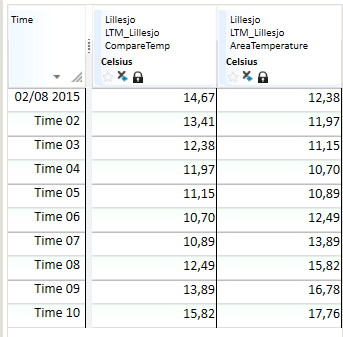
CompareTemp = @TS_OFFSET(@t('AreaTemperature'),-2)
With d = -2, each CompareTemp point shows the AreaTemperature value
from 2 hours earlier.
Example 2:
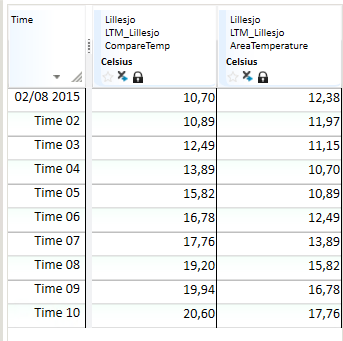
CompareTemp = @TS_OFFSET(@t('AreaTemperature'),3)
With d = 3, each CompareTemp point shows the AreaTemperature value
from 3 hours later.
Example 3:
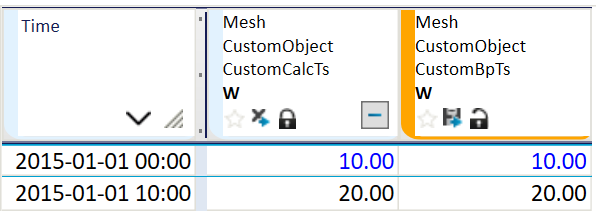
CustomCalcTs = @TS_OFFSET(@t('CustomBpTs'),2)
CustomBpTs is a staircase breakpoint time series with two points:
10 at 00:00 and 20 at 10:00. Even though we specify a 2-hour offset,
the resulting CustomCalcTs time series is the same as the input CustomBpTs
because the input has no points at 08:00 where the value 20 could be placed.